


 USD
USD EUR
EUR GBP
GBP CAD
CAD AUD
AUD HKD
HKD JPY
JPY KRW
KRW SGD
SGD NZD
NZD THB
THB TWD
TWD English
 繁體中文
繁體中文 日本語
日本語 한국어
한국어 ไทย
ไทย Bahasa Indonesia
 Français
 Español
 Deutsch
 Português
 Nederlands
 Tiếng Việt
By EVPADPro | 15 September 2026 | 0 Comments
SviCloud 15P Yogurt TV Mobile App: 5 Common Questions Answered
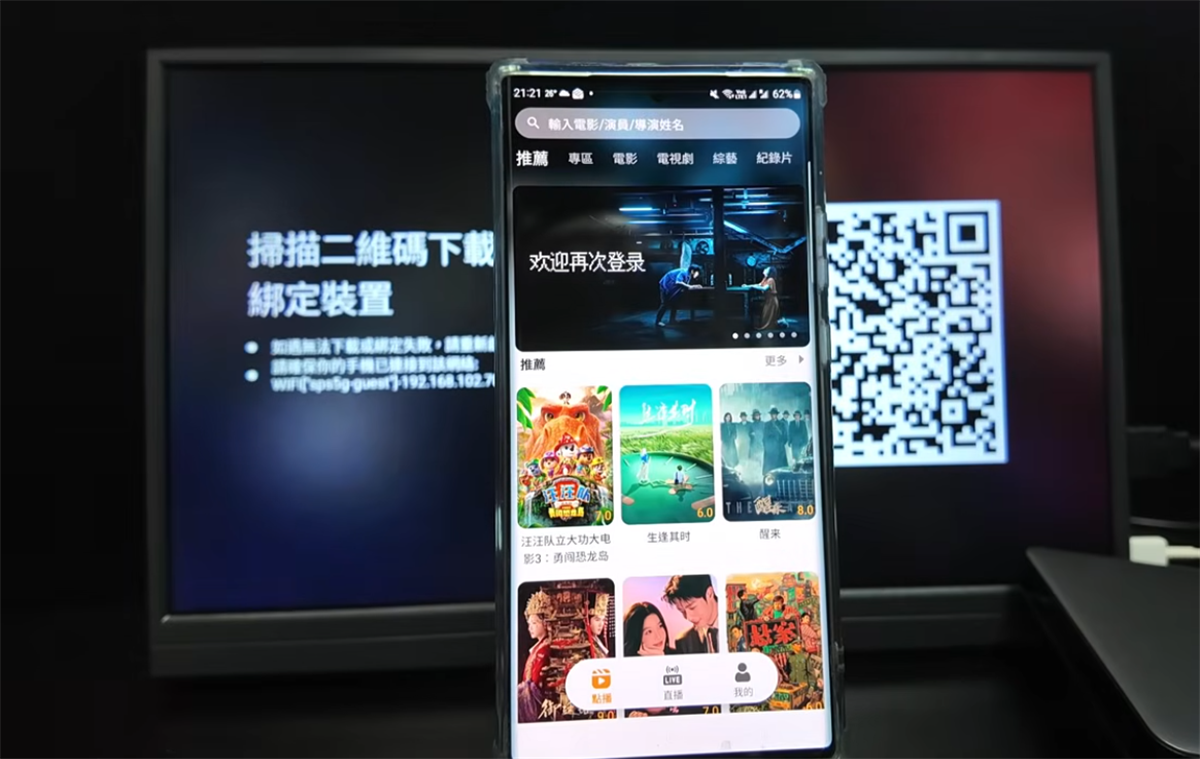
The new SviCloud 15P brings a major breakthrough compared with previous SviCloud models: users can now download the Yogurt TV App on their smartphones and tablets and enjoy it free for life.
Since the launch of SviCloud 15P, we have received many questions from users about how Yogurt TV works on mobile devices. Based on customer feedback and our own testing, we have put together answers to the questions users ask most frequently.
If you are considering the SviCloud 15P and want to know more about the Yogurt TV mobile experience, here are the answers.
1. Can I Watch Yogurt TV on My Phone or Tablet in Mainland China?
Yes, you can.
After successfully downloading and binding the Yogurt TV App to your smartphone or tablet, you can use the mobile or tablet device to watch Yogurt TV even when you are in Mainland China.
However, please note that this applies to the mobile and tablet version of Yogurt TV. The SviCloud TV box itself cannot be taken to and used in Mainland China.
This makes the mobile feature especially convenient for users who travel frequently or spend time in different countries.
2. Does My Phone or Tablet Need to Be on the Same Network as the TV Box?
No. You do not need to use the same network when watching Yogurt TV on your phone or tablet.
During the initial download and binding process, your mobile device needs to be connected to the same network as the SviCloud 15P TV box. This is required to complete the binding process.
Once the binding is successfully completed, however, the phone or tablet can use a completely different network.
For example, you can complete the binding at home and then take your smartphone or tablet abroad. As long as your mobile device has an available internet connection, you can continue using the Yogurt TV App.
This makes SviCloud 15P much more flexible for travel, business trips and international use.
3. Does the Yogurt TV Mobile App Support 7-Day Playback?
At the moment, the 7-day playback feature is not available on the mobile and tablet versions of Yogurt TV.
The TV box version and the mobile/tablet version have some differences in functionality. Therefore, if you specifically need the 7-day playback function, we recommend using Yogurt TV directly on your SviCloud 15P TV box.
We will continue to pay attention to user feedback and future updates to the mobile application.
4. Are Viewing Histories Shared Between the TV Box and Mobile App?
No. The viewing history on the SviCloud 15P TV box and the viewing history on the Yogurt TV App are independent of each other.
For example, if you watch a movie or TV program on your SviCloud 15P, that viewing record will not automatically appear in the Yogurt TV App on your smartphone or tablet.
Likewise, content watched on your phone or tablet will not appear in the TV box's viewing history.
Each device maintains its own viewing records, allowing you to manage and modify the history on each device separately.
5. Can I Watch Downloaded Content Without an Internet Connection?
Yes, this is another useful feature of the Yogurt TV mobile and tablet App.
On your smartphone or tablet, you can choose to download selected TV episodes or movies in advance. Once the content has been downloaded successfully, you can watch it later without an internet connection.
We also tested this feature ourselves.
When the phone or tablet has no network connection and you open the Yogurt TV App, a notification will automatically appear indicating that downloaded content has been found and asking whether you want to watch it.
Simply select the downloaded content and you can continue watching it offline.
This is particularly useful when traveling by airplane, staying somewhere without Wi-Fi, or when you simply want to save mobile data.
SviCloud 15P: More Than Just a TV Box
The addition of the Yogurt TV mobile and tablet App makes the SviCloud 15P significantly different from previous models.
Instead of being limited to watching content on your television, you can now extend your Yogurt TV experience to your smartphone and tablet, with lifetime free access after successful binding.
Whether you are relaxing at home, traveling abroad, going on a business trip, or simply want to watch your favorite content away from the TV, SviCloud 15P gives you more flexibility.
And with offline downloads available on mobile and tablet devices, you can even prepare your favorite movies and TV shows before going somewhere without an internet connection.
Choose the Official SviCloud Authorized Store
If you are looking to purchase the new SviCloud 15P, choose an official and authorized sales channel for greater peace of mind.
We are an officially authorized SviCloud designated sales website, providing customers with:
12-month official warranty
Lifetime free software upgrades
Lifetime technical support and consultation
Genuine SviCloud products
Professional after-sales service
What's more, two free gifts are currently included with your SviCloud 15P purchase:
Since the launch of SviCloud 15P, we have received many questions from users about how Yogurt TV works on mobile devices. Based on customer feedback and our own testing, we have put together answers to the questions users ask most frequently.
If you are considering the SviCloud 15P and want to know more about the Yogurt TV mobile experience, here are the answers.
1. Can I Watch Yogurt TV on My Phone or Tablet in Mainland China?
Yes, you can.
After successfully downloading and binding the Yogurt TV App to your smartphone or tablet, you can use the mobile or tablet device to watch Yogurt TV even when you are in Mainland China.
However, please note that this applies to the mobile and tablet version of Yogurt TV. The SviCloud TV box itself cannot be taken to and used in Mainland China.
This makes the mobile feature especially convenient for users who travel frequently or spend time in different countries.
2. Does My Phone or Tablet Need to Be on the Same Network as the TV Box?
No. You do not need to use the same network when watching Yogurt TV on your phone or tablet.
During the initial download and binding process, your mobile device needs to be connected to the same network as the SviCloud 15P TV box. This is required to complete the binding process.
Once the binding is successfully completed, however, the phone or tablet can use a completely different network.
For example, you can complete the binding at home and then take your smartphone or tablet abroad. As long as your mobile device has an available internet connection, you can continue using the Yogurt TV App.
This makes SviCloud 15P much more flexible for travel, business trips and international use.
3. Does the Yogurt TV Mobile App Support 7-Day Playback?
At the moment, the 7-day playback feature is not available on the mobile and tablet versions of Yogurt TV.
The TV box version and the mobile/tablet version have some differences in functionality. Therefore, if you specifically need the 7-day playback function, we recommend using Yogurt TV directly on your SviCloud 15P TV box.
We will continue to pay attention to user feedback and future updates to the mobile application.
4. Are Viewing Histories Shared Between the TV Box and Mobile App?
No. The viewing history on the SviCloud 15P TV box and the viewing history on the Yogurt TV App are independent of each other.
For example, if you watch a movie or TV program on your SviCloud 15P, that viewing record will not automatically appear in the Yogurt TV App on your smartphone or tablet.
Likewise, content watched on your phone or tablet will not appear in the TV box's viewing history.
Each device maintains its own viewing records, allowing you to manage and modify the history on each device separately.
5. Can I Watch Downloaded Content Without an Internet Connection?
Yes, this is another useful feature of the Yogurt TV mobile and tablet App.
On your smartphone or tablet, you can choose to download selected TV episodes or movies in advance. Once the content has been downloaded successfully, you can watch it later without an internet connection.
We also tested this feature ourselves.
When the phone or tablet has no network connection and you open the Yogurt TV App, a notification will automatically appear indicating that downloaded content has been found and asking whether you want to watch it.
Simply select the downloaded content and you can continue watching it offline.
This is particularly useful when traveling by airplane, staying somewhere without Wi-Fi, or when you simply want to save mobile data.
SviCloud 15P: More Than Just a TV Box
The addition of the Yogurt TV mobile and tablet App makes the SviCloud 15P significantly different from previous models.
Instead of being limited to watching content on your television, you can now extend your Yogurt TV experience to your smartphone and tablet, with lifetime free access after successful binding.
Whether you are relaxing at home, traveling abroad, going on a business trip, or simply want to watch your favorite content away from the TV, SviCloud 15P gives you more flexibility.
And with offline downloads available on mobile and tablet devices, you can even prepare your favorite movies and TV shows before going somewhere without an internet connection.
Choose the Official SviCloud Authorized Store
If you are looking to purchase the new SviCloud 15P, choose an official and authorized sales channel for greater peace of mind.
We are an officially authorized SviCloud designated sales website, providing customers with:
12-month official warranty
Lifetime free software upgrades
Lifetime technical support and consultation
Genuine SviCloud products
Professional after-sales service
What's more, two free gifts are currently included with your SviCloud 15P purchase: